Java4Shell: Why a Critical Vulnerability Doesn't Mean Every System Is at Risk

What’s on this page
Java4Shell (CVE-2026-114938) is a critical vulnerability that could allow unauthenticated attackers to execute code on affected Java applications under specific conditions. Disclosed on 17 November 2026, it demands prompt action, but the first challenge for many organisations is knowing which systems are exposed. CTM360’s HackerView helps teams discover and monitor internet-facing assets, providing a starting point for identifying systems that need investigation.
Not every system running Java is vulnerable. Exposure depends on the Java runtime, the processor features available to it and how the application handles incoming data. External discovery is only the first step: confirming Java4Shell risk requires internal checks and information from software suppliers. Microsoft recommends updating affected runtimes and third-party applications as soon as possible.
What Is Java4Shell?
Java4Shell affects an accelerated Base64 decoder in certain Java runtimes. Base64 is an encoding method applications use to represent data, including information used in authentication and file uploads.
If an affected application processes specially crafted input, the flaw can corrupt memory. This may cause the Java process to crash or, in some cases, allow an attacker to execute code with the permissions of that process.
Some applications process Base64 data before a user signs in. For those applications, a login requirement alone may not prevent an attack. Red Hat describes this risk for affected Keycloak deployments.
Why Not Every Java System Is Exposed
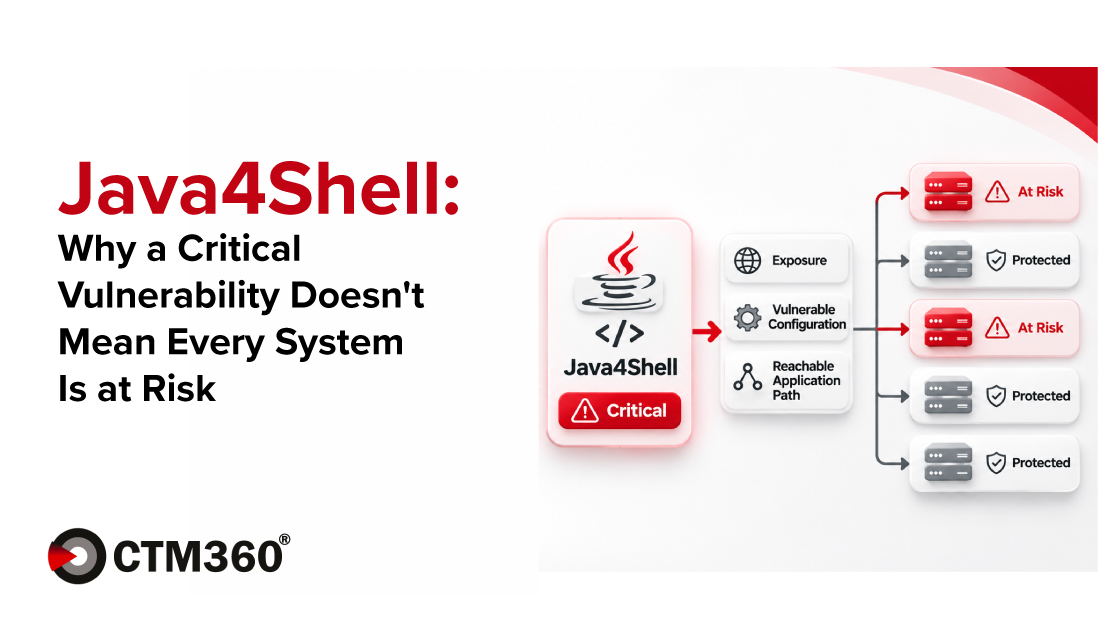
Exploitation depends on several conditions:
- Java runtime: The application must be running an affected, unpatched Java build.
- Processor and runtime configuration: The affected accelerated decoder requires an x86-64 processor supporting AVX-512 VBMI, with the vulnerable acceleration path enabled. ARM64 systems and x86-64 systems without this processor feature are not known to be affected.
- Application behaviour: Attacker-controlled data must reach the affected decoder.
These conditions make it important to assess each system rather than assume that every Java installation is vulnerable. At the same time, organisations should not delay updating affected software while waiting for a complete assessment of every possible attack path.
Finding Java Hidden Inside Other Software
Java is not always listed as a separate installation. Software suppliers may package a Java runtime inside an application, container image or appliance. Test systems and older applications may also be missing from an organisation’s inventory.
Checking only the system-wide Java installation is not enough. Organisations should also identify Java runtimes bundled with individual applications and verify whether those runtimes are affected.
A clean scan cannot confirm the safety of systems it never examined. CISA advises organisations to check for bundled Java runtimes as part of their response.
Three Questions Every Organisation Should Answer
1. Where are affected Java runtimes running?
Review servers, business applications, container images and appliances, including software supplied by third parties. Assign an owner to each system so the version, exposure and update path can be confirmed.
2. Which systems should be investigated first?
Prioritise internet-facing applications and important business services. Check the Java build, the processor features available to the running system, its configuration and whether untrusted input can reach the vulnerable decoder. Ask suppliers whether their products are affected and which fixes they recommend.
3. How will we reduce and verify the risk?
Apply the security update recommended by the Java or application supplier, then verify that the application is running the updated runtime. Updates have been released, but availability and instructions vary by distribution and product.
Where an update is not yet available, follow the supplier’s guidance for temporary mitigation. For example, Red Hat documents a startup setting that disables the affected acceleration path for relevant deployments. Test the change, restart affected instances and verify that the setting is active.
Microsoft has also published Azure Web Application Firewall guidance to help detect and block known HTTP-based exploitation patterns while organisations apply updates. These protections are supplementary and do not replace patching.
How CTM360 Helps Teams Understand External Exposure
Knowing which systems are accessible from the internet is an important first step.
CTM360’s HackerView helps organisations discover and monitor their external digital assets. This can help security teams identify systems that need investigation and prioritise their response.
External discovery alone cannot confirm every bundled Java version or establish whether all conditions for Java4Shell exploitation are met. Those answers require internal checks and information from software suppliers.
The goal is straightforward: find the systems, confirm the risk and update what needs fixing.
Request a demo to see how CTM360 can help your team understand its external exposure.