CTM360 Hardening Guidelines

USE CASE: POST-EXPLOITATION IMPACT OF LOG4JSHELL VULNERABILITY
By
CTM360 Team
January 11, 2022
1 mins read
CTM360 Hardening Guidelines
background-graphics

What’s on this page

Overview
CTM360’s observation of the trend
Recommendations

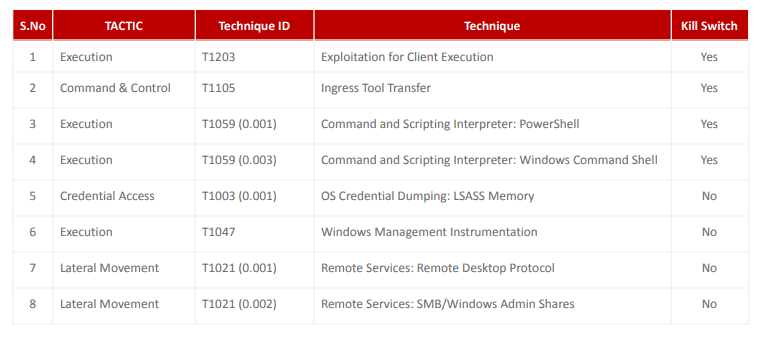
Log4j vulnerability (CVE-2021-44228) allows unauthenticated remote code execution and is triggered when a specially crafted string provided by the attacker through a variety of different input vectors, is parsed and processed by the Log4j vulnerable component. Microsoft stated that a vast majority of post-exploitation activities had been observed and based on the nature of the vulnerability, once an attacker has full access and control of an application, they can perform a myriad of objectives including installing coin miners, Cobalt Strike to enable credential theft and lateral movement as well as exfiltrating data from compromised systems. Relevant to Log4j vulnerability below are the most common MITRE ATT@CK Techniques that an attacker may leverage to compromise systems.
pic1

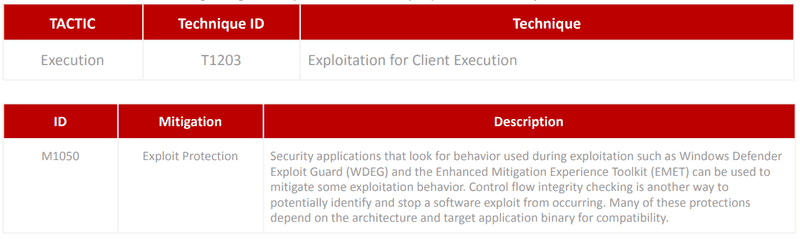
TECHNIQUE#1 - Exploitation for Client Execution

Adversaries may exploit software vulnerabilities in client applications to execute code. Vulnerabilities can exist in software due to insecure coding practices that can lead to unanticipated behavior. Adversaries can take advantage of certain vulnerabilities through targeted exploitation for the purpose of arbitrary code execution.
pic2

CTM360: Mitigation Guidelines:

Note: Before disabling a service/configuration, please check if any endpoint requires it for a specific use case and only allow it where necessary.

Option 1:

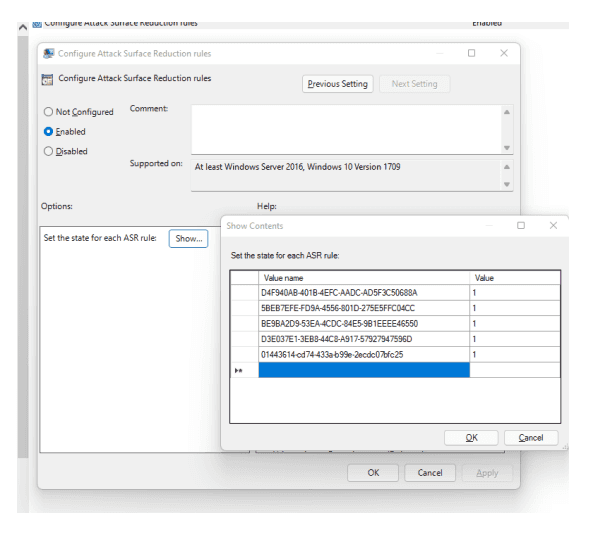
Enable ASR (Attack Surface Reduction) from Group Policy: By leveraging MS ASR rules and relevant IDs to block specific actions from executing on Desktop or Server

Open Group Policy Editor [Local/Domain] click Computer Configuration > Policies > Administrative templates > Windows components > Microsoft Defender Antivirus > Microsoft Defender Exploit Guard > Attack surface reduction.

On Right Side double click on “Configure Attack surface reduction rules” and select Enabled.

Now under options: click on the Show… button and the Show Contents windows will Open.

In Value Name type the below IDs and set the Value to 1 for each rule and click OK to save settings.

Block execution of potentially obfuscated scripts

ID = 5BEB7EFE-FD9A-4556-801D-275E5FFC04CC Value = 1
Block JavaScript or VBScript from launching downloaded executable content

ID = D3E037E1-3EB8-44C8-A917-57927947596D Value = 1
Block Office application from creating child processes

ID = d4f940ab-401b-4efc-aadc-ad5f3c50688a Value = 1
Block Office applications from injecting code into other processes

ID = 75668c1f-73b5-4cf0-bb93-3ecf5cb7cc84 Value = 1
Block Win32 API calls from Office macros

ID = 92e97fa1-2edf-4476-bdd6-9dd0b4dddc7b Value = 1
pic3

Option 2:

Block Office Macros From Group Policy

(Below steps for Microsoft office 2016/2019) Install the Office 2016 Administrative Template files (ADMX/ADML) and Office Customization Tool on the Active Directory Domain Controller Upon completing the installation, follow the steps below: (For office2016, download the templates from Microsoft. Download link)

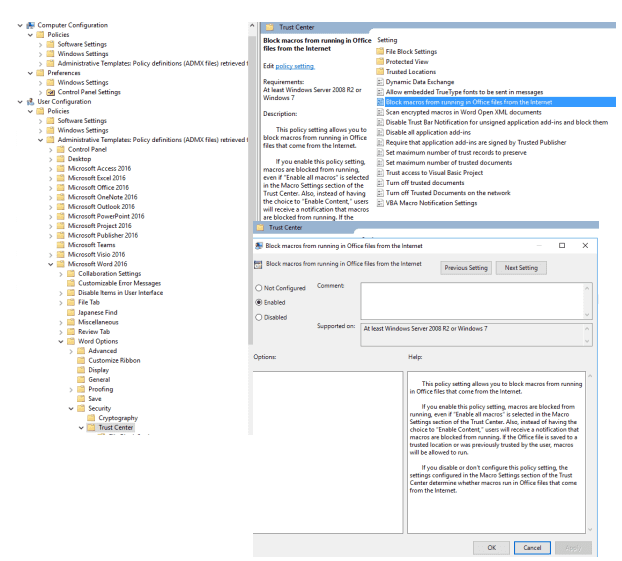
Open Group Policy Editor[Local/Domain] > User Configuration > Policies > Administrative templates > Microsoft Word 2016 > Word options > Security > Trust Center

On the right side double click on “Block macros from running in Office files from the Internet” and select Enabled > Click OK to save settings. Double click on “VBA Macro Notification Settings” and select Enabled

Under options select "Disable all without notification" from the drop-down list. Note: Follow the above steps to disable Macros for other Microsoft Office Applications like Excel, PowerPoint etc.)
pic4

Option 3:

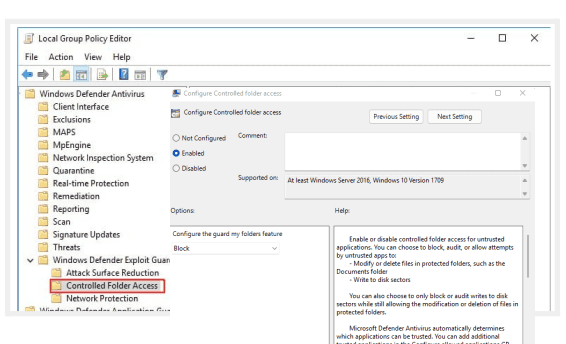
Enable Controlled Folder Access Controlled folder access helps protect your valuable data from malicious apps and threats, such as ransomware. Open Group Policy Editor[Local/Domain] > Computer Configuration > Policies > Administrative Templates > Windows components > Microsoft Defender Antivirus > Microsoft Defender Exploit Guard > Controlled folder access

On the right side window double click on “Configure Controlled folder access” and select Enabled

Under options > Configure the guard my folders feature Select Block from the drop-down list and Click OK to Save Settings. This is a strict mode where untrusted apps cannot make any changes to files inside protected folders.

Note: Enable this with caution as it may affect the organization’s productivity
pic5
  • TECHNIQUE#2 - Ingress Tool Transfer
  • TECHNIQUE#3 - Command and Scripting Interpreter: PowerShell
  • TECHNIQUE#4 - Command and Scripting Interpreter: Windows Command Shell
  • TECHNIQUE#5 - OS Credential Dumping: LSASS Memory
  • TECHNIQUE#6 - Windows Management Instrumentation
  • TECHNIQUE#7 - Remote Services: Remote Desktop Protocol
  • TECHNIQUE#8 - Remote Services: SMB/Windows Admin Shares

Recommendations

This hardening guide is part of CTM360’s ongoing strategy to provide actionable insights and tangible recommendations for major ransomware families. Our research team will be sharing such advisories frequently to ensure organizations globally become a harder target and can prevent the impact of ransomware proactively. We invite your feedback and welcome your input for future editions of our security hardening series. Kindly reach out to monitor@ctm360.com for any communication.

Recent Blogs

Overview

The fight against email-based threats is intensifying. Following the lead of Google and Yahoo, Microsoft has officially announced the mandatory implementation of email authentication protocols, SPF, DKIM, and DMARC, for high-volume email senders, effective May 5, 2025. Domains sending over 5,000 daily emails to Microsoft's platforms, including Outlook.com, Hotmail.com, and Live.com, will be required to authenticate their messages. Initially, non-compliant messages will be redirected to recipients' Junk folders, with eventual total rejection expected if compliance isn't achieved. This enforcement represents a critical step in securing global email communications from spoofing and phishing threats (Microsoft Tech Community).

Understanding Email Authentication

Email authentication has become essential in combating increasingly sophisticated phishing and spoofing attacks. Three core standards have been adopted widely:

  • Sender Policy Framework (SPF: RFC 7208): Verifies the legitimacy of the sending mail server, ensuring messages originate from authorized infrastructure. SPF helps prevent sender address forgery by defining authorized sending sources in DNS records.
Sender Policy Framework
  • DomainKeys Identified Mail (DKIM: RFC 6376): Cryptographically signs email messages, allowing recipients to confirm message content hasn't been altered in transit. DKIM leverages public-private key pairs to ensure message integrity and authenticity.
DomainKeys Identified Mail
  • Domain-based Message Authentication, Reporting, and Conformance (DMARC: RFC 7489): Combines SPF and DKIM to enforce domain alignment, verify authenticity, and provide reporting mechanisms for senders to track email usage and potential abuse. DMARC is recommended to be implemented in three incremental stages: initial monitoring (p=none), intermediate quarantining of suspicious messages to test the policy impact (p=quarantine), and full rejection of unauthorized emails to achieve DMARC compliance (p=reject). 
Domain-based Message Authentication, Reporting, and Conformance

Email Content and Delivery Best Practice Guidance

To help the email ecosystem thrive and ensure that legitimate communications reach users' inboxes, major providers like Google, Yahoo, and Microsoft have released a unified set of technical and content-based requirements. This section consolidates these guidelines into a single resource for senders seeking to avoid spam filtering and maintain high deliverability rates.

1. Message Headers & Structural Integrity

Best Practice Description
Valid and consistent From header Use a single, clear email identity. Avoid multiple addresses in From and misleading sender names.
Aligned Reply-To domain Ensure Reply-To reflects the same domain or purpose as From.
Unique and compliant Message-ID Follow RFC 5322 formatting. Avoid duplicate or malformed IDs.
Proper MIME structure and header syntax Messages must conform to standard email formatting. Avoid malformed headers and nested MIME issues.
Avoid forged headers Do not spoof or misuse headers associated with major domains (e.g., gmail.com, outlook.com).

2. Content Hygiene and Formatting

Best Practice Description
Avoid deceptive subject lines Refrain from using misleading tags like "RE:" or "FWD:" unless applicable.
Balanced text-to-image ratio Do not send image-only emails. Include meaningful text with alt text for images.
Email size < 100 KB Ensure the email body stays within standard size limits (typically under 100 KB) to avoid clipping in mail clients. This refers only to the message content and does not include attachments.
Professional formatting Avoid ALL CAPS, excessive punctuation, invisible text, and non-standard fonts.
Exclude scripts and forms Embedded forms or JavaScript will trigger spam or phishing filters.
Consistent branding and tone Use recognizable logos, colors, and sender names to build trust.

3. Infrastructure and Technical Configuration

Best Practice Description
SPF configuration Define valid authorized sending sources in the domain’s SPF record. Must align with the domain in the From header.
DKIM configuration Cryptographically sign messages using DKIM with a domain that matches the From address.
DMARC configuration Publish a DMARC record at minimum with p=none. Domain alignment with SPF or DKIM is required to pass DMARC checks.
Valid PTR (reverse DNS) records The sending IP address must resolve to a valid hostname that maps back to the same IP address.
TLS for outbound SMTP TLS is mandatory for Gmail. Senders without encryption may be rejected.
SPF lookup limit adherence Keep SPF DNS lookups ≤ 10. Microsoft enforces this.
IP/domain warming Gradually increase send volume from new IPs or domains to build a reputation.
Consistent sending patterns Avoid sending bursts or erratic volumes. Maintain daily volume stability.
ARC headers for forwarded email ARC ensures original authentication results are preserved through intermediaries.

4. Recipient List Management

Best Practice Description
Explicit opt-in only Do not use purchased lists. Only email users who have explicitly subscribed.
Functional one-click unsubscribe Add RFC-compliant headers:
List-Unsubscribe: <https://domain/unsub?id=xyz>
List-Unsubscribe-Post: List-Unsubscribe=One-Click
Unsubscribe fulfillment within 48 hours Honor removal requests promptly to reduce complaints.
List cleaning and bounce management Regularly purge unengaged, bounced, or invalid addresses.
Segmentation by message type Separate promotional, transactional, and notification content using distinct sender identities.

5. Engagement and Complaint Monitoring

Tool / Method Purpose
Google Postmaster Tools Monitor domain/IP reputation, spam rate, and user engagement.
Yahoo Complaint Feedback Loop (CFL) Receive ARF reports for complaints and unsubscribe flagged users.
Maintain a complaint rate < 0.3% High complaint rates trigger deliverability throttling and domain penalties.
Monitor bounce and open rates Use these to assess the health of your lists and campaigns.

6. Summary Recommendations

  1. Align headers and domains with clear, professional identities.
  2. Respect opt-in and unsubscribe behaviors with transparent mechanisms.
  3. Structure content to be clean, concise, and free of deceptive or spammy characteristics.
  4. Maintain technical hygiene through DNS, TLS, SPF limits, and ARC usage.
  5. Monitor sender reputation and user engagement continuously.
  6. Ensure SPF and DKIM are properly configured and aligned with the domain in the From header, and publish a DMARC record with at least p=none to begin monitoring and enforcement.

Immediate Impact and Risks of Non - compliance

As of May 2025, domains that fail SPF or DKIM checks or lack a correctly configured DMARC policy with alignment will risk having their emails marked as spam or not delivered at all. Misalignment occurs when the domain used in the message's "From" address doesn't match the domains authenticated by SPF or DKIM.

Organizations failing to comply face significant risks, including diminished deliverability rates, compromised customer trust, and increased susceptibility to impersonation attacks. These impacts directly affect an organization's reputation, customer engagement, and potentially, its revenue.

Actionable Recommendations for Immediate Implementation

To effectively prepare for these mandatory standards, organizations should:

  • Audit current DNS records: Utilize tools such as "dig" or Google DNS to verify SPF, DKIM, and DMARC records.
  • Begin with Monitoring (p=none): Initially deploy DMARC in monitoring mode to understand email flows and detect anomalies without risking legitimate email delivery.
  • Gradually enforce stricter policies: Move from quarantine to full rejection while monitoring.
  • Ensure domain alignment: "From" domain must match what’s authenticated via SPF or DKIM.
  • Maintain email hygiene: Clean lists, include a clear opt-out option, and avoid using misleading subject lines or headers.

Start Your DMARC Journey with CTM360 Free Community Edition

To support organizations navigating these changes, CTM360 offers a complimentary zero-cost Community Edition platform. It allows comprehensive monitoring, management, and enhancement of your DMARC records and email authentication setup. This proactive approach helps organizations reduce risks associated with impersonation attacks and maintain reliable email communication.

Join CTM360 Community Edition today, no hidden costs, simply real security.

Reference:

Disclaimer:

The information contained in this document is meant to provide general guidance and brief information to the intended recipient pertaining to the incident and recommended action. Therefore, this information is provided "as is" without warranties of any kind, express or implied, including accuracy, timeliness, and completeness.

Consequently, under NO condition shall CTM360®, its related partners, directors, principals, agents, or employees be liable for any direct, indirect, accidental, special, exemplary, punitive, consequential, or other damages or claims whatsoever including, but not limited to loss of data, loss in profits/business, network disruption...etc., arisina out of or in connection with this advisory.

For more information: Email: monitor@ctm360.com Tel: (973) 77 360 360

CTM360 has observed a sudden rise in Whatsapp accounts being hijacked in the MENA Region. In most cases, this occurs through social engineering, in which the victim would receive a Whatsapp message or phone call; they are usually requested to provide verification codes or personal/confidential information. Such disclosure would enable the hijackers to take over their victims’ Whatsapp accounts.

Following these occurrences, scammers could then use these accounts to impersonate the victim or even Whatsapp’s support team, usually to send suspicious links to unsuspecting users, or further implement social engineering techniques on other potential victims.

ALTERNATE METHODS USED TO HIJACK WATSAPP ACCOUNTS

CTM360 has observed a sudden rise in Whatsapp accounts being hijacked in the MENA Region. In most cases, this occurs through social engineering, in which the victim would receive a Whatsapp message or phone call; they are usually requested to provide verification codes or personal/confidential information. Such disclosure would enable the hijackers to take over their victims’ Whatsapp accounts.

Following these occurrences, scammers could then use these accounts to impersonate the victim or even Whatsapp’s support team, usually to send suspicious links to unsuspecting users, or further implement social engineering techniques on other potential victims.

Alternate methods used to hijack watsapp accounts

Although most attacks occur through social engineering, many scammers had deviated from their traditional methods. Some key examples may include but are not limited to:

  • Brand impersonation: Big brands may often be targeted, e.g. banks and financial institutions, to display a sense of legitimacy. Threat actors may often use a well-known brand image claiming to be from a reputable company. With a convincing display, it wouldn’t take much effort to attain trust and obtain confidential information from victims.
  • High profile Impersonation: Scammers may often choose to impersonate C-level executives of large, well-known organizations and other well-known influential personalities. Assuming the character of high profile individuals may convey a sense of importance to the victim, and perhaps invoke a sense of urgency to respond and comply with any given requests.
  • Hijacked Whatsapp Accounts: Scammers may use hijacked Whatsapp accounts to send malicious links or requests to the previous account owner’s contacts. Since the contacts are already connected with the victim, the sense of trust may be used to the scammer’s advantage.
  • Fake Promotions: Fraudsters may often send links or messages containing information regarding special promotions on fake E-commerce sites. These sites would often lure their victims into providing their WhatsApp registration codes.
  • Compromising Victims Voicemail Using Default Password: Scammers may bypass the Whatsapp verification process with the help of the target's voicemail account. This is done when the hacker repeatedly fails the registration code and Whatsapp performs a voice verification by calling the victim directly. By initiating the attack at odd hours, scammers would be able to redirect the message to the victim’s voicemail, which the hacker can easily penetrate to recover the audio message. As a result, victims may get their account stolen without even realizing what had happened.

SECURE YOUR WHATSAPP ACCOUNT

WhatsApp users are advised to take necessary precautionary measures to protect themselves from falling victim to attacks. Some of these include:

  • Protecting your WhatsApp account by enabling the ‘Two-Step Verification’ feature; is found under the ‘Settings’ tab of your WhatsApp application. Users may also enable the option of a backup email address if they wish.
  • Changing your default voicemail PIN. Please refer to your respective Telco service providers for information on changing/resetting your voicemail PIN.
  • Do not share your WhatsApp account verification codes or any One-Time Passwords (OTP) with anyone. You may receive suspicious messages from existing contacts or strangers via WhatsApp. Do not respond, especially if the sender requests an OTP or code. Also do not click on any links or provide any personal information.
  • Verify the authenticity of the messages through alternative means (e.g. calling the contact, online research etc.) If the suspicious messages are from unknown numbers, report the contact to WhatsApp directly.

CTM360 discovered an ongoing fraudulent activity on Meta's social media platform, ‘Facebook’.

Threat Overview

While conducting fraud hunting exercises, CTM360 discovered an ongoing fraudulent activity on Meta's social media platform, ‘Facebook’. This particular scam involves scammers using Facebook public groups to disseminate fraudulent schemes. These groups are created solely to bait victims. By leveraging these groups, the scammers can reach a large audience that shares common interests or belongs to specific regions. Unfortunately, this fraudulent activity has resulted in financial losses for many unsuspecting individuals.

screenshot 2024 01 29 at 8 51 03 am
screenshot 2024 01 29 at 8 51 10 am

Fraud Methodology

The scammers begin by either scouting Facebook groups OR creating new groups that serve the scammer's goal, aiming to identify the target audience. This is likely done through various criteria such as:

  • Page Topic: the main drive and title that define the overall niche.
  • User Interests: the general interest and posts shared in the group by the members.
  • Targeted Region: the location where the scammer wants to target the users.
  • Scammers are carrying their scams through Facebook and specifically through Facebook groups to abuse its private nature with the ability to mask the profile’s name causing a noticeable rise in fraudulent activities advertised with untraceable users - through the "Anonymous Participant" feature in Facebook Groups.
  • Within the suspicious posts, scammers are claiming to provide bogus services like:
  • Fraudulent Payment Installments
  • Loans or loan restructuring
  • Issuance of Credit Cards with high limits
  • Fake Job Posting
  • Stolen Gift cards

Why Should Organizations Be Concerned?

To reflect legitimacy of the fraudulent promotional post the scammers abuse genuine company name or genuine product brands.

Scammers adopt various tactics, such as presenting themselves as authentic sellers offering enticing deals on products. So they are “impersonating” your organization, brand or identity of your executive management.

Their goal is not to deliver the promised items at all or to provide counterfeit goods. Hence they impersonate well-known brands, celebrities, or even users' friends within these groups, leveraging these false identities to deceive individuals into disclosing sensitive information or making monetary transactions.

One variation of the scam posts claims to host free giveaways or contests. These seemingly attractive offers often serve as a guise to harvest personal information or involve users in deceptive activities. The other scam cases range from inquiries about installment options, salary transfers, credit card applications, loans, and job opportunities to scams like Advance-Fee Fraud.

The unauthorized use of an organization's brand name in posts within such Facebook groups poses a significant concern. At minimum it has implications on reputation, furthermore your customers could suffer financial losses or compromise their personal information, leading to broader implications for both the organization and the affected individuals.

Threat Impacts

The fraudulent posts published in these groups can have various threat impacts on the users such as:

  • Financial Loss: These posts often involve fraudulent loan offers that target individuals who are in need of financial assistance. Scammers may request upfront fees or personal information, promising a loan that never materializes.
  • Expose Personal Information: When users share personal and financial information in response to fake offers in Facebook groups, there is a risk that this information may be shared or sold to third parties without their consent.
  • Phishing Attack: Some loan scams may involve indirect phishing attempts, where scammers might trick individuals into providing their login credentials or other sensitive information through fake loan application forms or websites.

Recommendations

For Businesses:

  • Spread Awareness: Conduct awareness campaigns on official social media to educate customers about such scams.
  • Active Monitoring & Takedowns of Baiting Facebook Groups: Such baiting groups should be actively monitored and any infringement identified related to your brand should be reported to vendors for further actions such as Takedown.

For Individuals:

  • Be cautious with personal information: Avoid sharing personal information in Facebook groups, especially if the posts seem suspicious or potentially fraudulent. Protect your identity and be wary of any requests for sensitive information.
  • Don't Pay Upfront Fees: Legitimate lenders typically deduct fees from the loan amount or include them in the repayment plan. Be cautious of these scammers who request upfront fees before providing the loan. This is a common red flag for scams.